
hive整合iceberg
在Hive中添加iceberg的jar包
需要两个jar包iceberg-hive-runtime-1.1.0.jar和libfb303-0.9.3.jar
在apache官网可以下载到iceberg-hive-runtime-1.1.0.jar:https://iceberg.apache.org/releases/
在中央仓库可以下载到libfb303-0.9.3.jar:https://repo1.maven.org/maven2/org/apache/thrift/libfb303/0.9.3/
下载好后添加到服务器上的{HIVE_HOME}/lib下
修改配置
1 | vi {HIVE_HOME}/conf/hive-site.xml |
添加如下配置:
1 | <property> |
然后启动hive就可以了
hive操作iceberg表
1 | create table test_iceberg_tbl( |
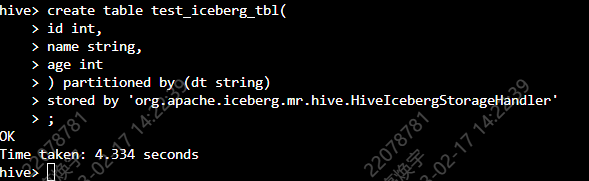
出现OK,说明创建成功
添加jar包
1 | add jar /opt/cloudera/parcels/CDH/lib/hive/lib/iceberg-hive-runtime-1.1.0.jar; |

添加成功!
插入数据
1 | insert into test_iceberg_tbl values(1,'zhangsan',18,'20230217'); |
然后在HDFS上可以看到我们刚刚创建的表
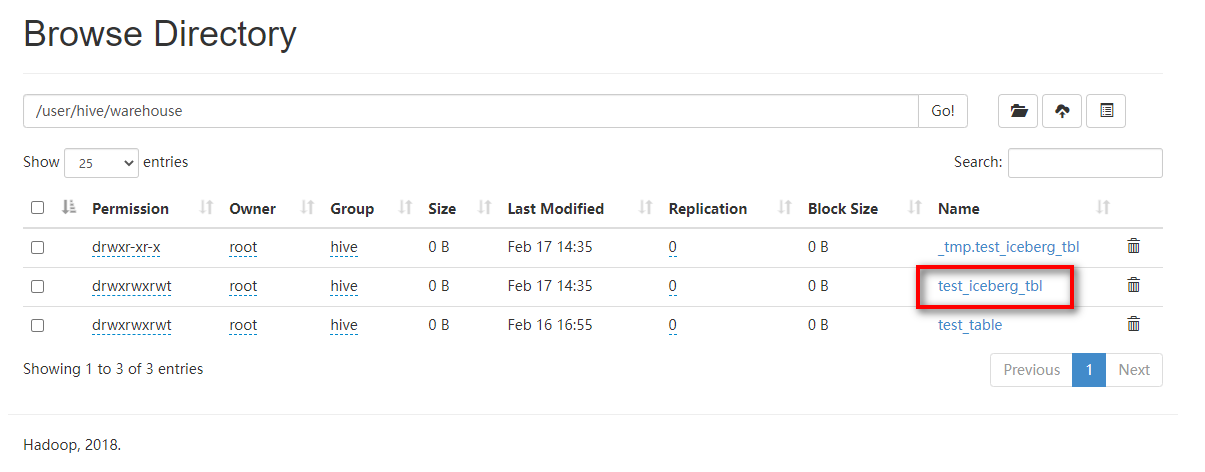
查询数据
1 | select * from test_iceberg_tbl; |
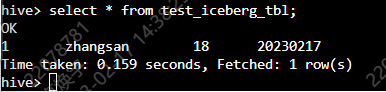
可以看到我没刚刚插入的数据
使用catelog创建表
1 | set iceberg.catalog.another_hive.type=hive; |
插入数据
1 | insert into test_iceberg_tbl2 values(1,'lisi',18,'20230217'); |
评论